

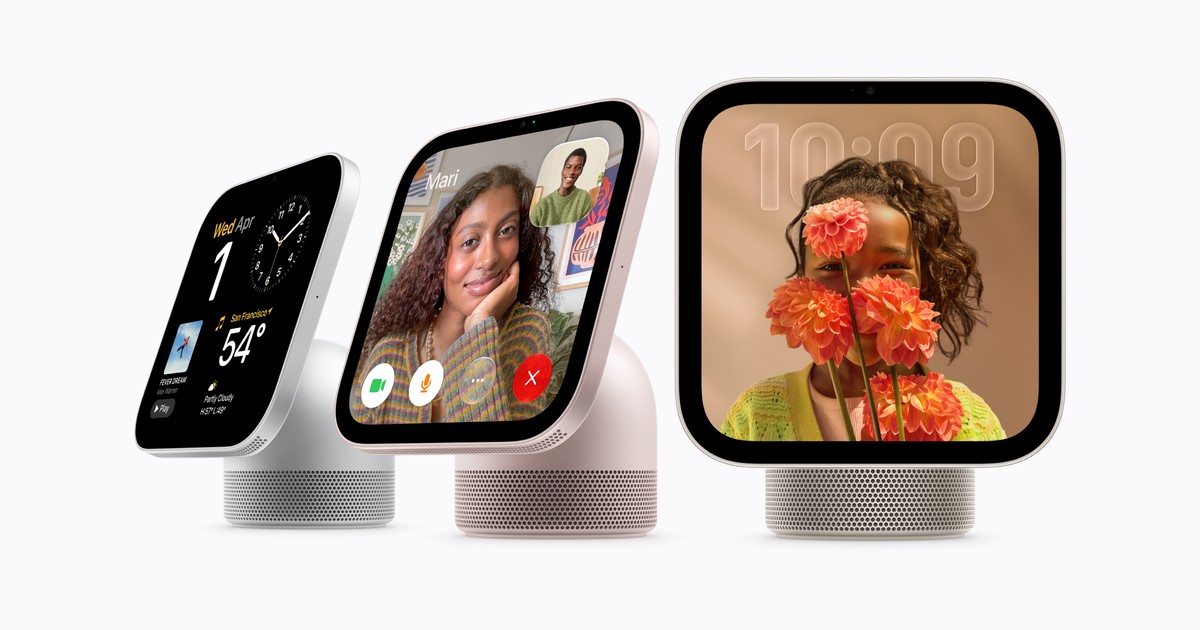
Updated November 14, 2026. Apple HomeView went on sale in Canada on November 13. Its display can handle media, FaceTime and smart-home controls, but Apple also promotes personalized Siri AI requests that draw on a paired iPhone or iPad. If you already own a used Apple device, the practical question is whether it can set up HomeView at all, or whether you need a newer model with Apple Intelligence. Those are separate requirements.
The short answer
You do not need to assume that every HomeView owner must buy a new Apple Intelligence iPhone or iPad. Apple's launch information says setup and multiuser support require a compatible iPhone or iPad running the latest software. It separately says personal-context requests require an Apple Intelligence-enabled iPhone or iPad, also running current software, with Siri AI enabled and set to a supported language. Apple has not supplied a single model-by-model HomeView setup list in that announcement. Check the device, software and current setup instructions before purchasing specifically for HomeView.
Put another way, there are three tiers to consider: a phone or tablet that can take part in HomeView setup; an Apple Intelligence model that can provide personal context to Siri AI; and a household configuration that allows private content to appear for recognized users. Buying a newer device solely for the second tier may not be necessary if you primarily want a shared display, music, FaceTime or home controls.
Which used iPhones can run the current software?
Apple's iOS 27 compatibility guide includes iPhone 11 and later families and iPhone SE (2nd generation) or later. A used iPhone 13, 14 or standard iPhone 15 is therefore capable of receiving the current iOS generation. That makes it worth checking for HomeView setup, but OS compatibility alone is not an Apple promise that every HomeView feature works on every listed model. Apple says the setup device must run the latest software. Check Settings > General > Software Update on the actual phone, and confirm that the Home app and your Apple Account work normally.
For personal-context Siri AI, Apple's Apple Intelligence device list is narrower. It includes iPhone 15 Pro and 15 Pro Max, iPhone 16 models and later, iPhone Air and iPhone Duo. A standard iPhone 15, any iPhone 14 or an iPhone 13 is outside that list even if it can run iOS 27. For example, an iPhone 15 Pro is a more appropriate used-phone candidate if you want HomeView to refer to your own messages or calendar in a Siri request. If you only plan to control lights and play music, do not treat that Pro-model requirement as a general HomeView purchase requirement.
Which used iPads are relevant?
Apple's iPadOS 27 compatibility guide includes iPad mini (6th generation) and later, iPad (9th generation) and later, iPad Air (4th generation) and later, and several iPad Pro generations. These are useful starting points when assessing whether an existing iPad can run the latest software for HomeView setup. As with iPhone, the announcement does not establish that software support by itself confirms every HomeView feature. Check the precise model and update state before buying a used iPad for the task.
For personal-context Siri AI, Apple's Apple Intelligence list names iPad mini (A17 Pro and A20 Pro) and iPad models with M1 or later. A sixth-generation iPad mini is not on that list; the A17 Pro mini is. Likewise, an iPad Air with M1 is a candidate for Apple Intelligence, while the older fourth-generation Air is not. This distinction is more useful than simply reading “iPad mini” or “iPad Air” in a resale listing. If the generation is unclear, our guide to identifying an iPad model shows where to find it.
What does personal context actually add?
Apple says Siri AI on HomeView can answer general questions on the HomeView itself. When paired with an Apple Intelligence-enabled iPhone or iPad, it can also draw on the user's own calendar, messages and relevant app information to respond to personalized requests. An example would be asking HomeView about a date mentioned in a recent message or an appointment on your calendar. That is different from asking it for the weather, playing a song or controlling a compatible lamp.
Apple's HomeView software notes say personal-context requests require the paired device to have Siri AI turned on, use a supported language and run the latest software. Siri AI on HomeView is currently in beta. Apple also says some server-side Apple Intelligence features have daily usage limits, with expanded access planned for a fee. These details are worth checking again later, as software and language support may change. Do not buy a used phone solely on an assumption that a future language or feature will become available by a specific date.
Does language affect Canadian households?
Yes. Apple's launch notice says HomeView and Siri AI on HomeView are available in English in Canada. Its software notes add that the paired iPhone or iPad must be set to the same English variant. Apple says Canadian French support will arrive later through a free update, but it has not provided a specific date in the launch notice. A household that currently uses French as its device or Siri language should check Apple's live language support before ordering. The general Apple Intelligence language list is broader than the languages available on HomeView, so the two should not be confused.
This is also relevant to a used device imported from another region. The physical model may qualify for Apple Intelligence, but language, region, software and account settings still affect feature availability. Verify the active configuration on the device rather than relying only on its marketing name.
What about multiuser access and privacy?
Apple says HomeView can recognize up to six people and adjust displayed content for each. Its software notes explain that private content such as Messages and Calendar is intended to appear when the user is recognized and a paired iPhone or iPad has been recently unlocked and is on the same Wi-Fi network. Apple describes a limited exception when a paired device has temporarily disconnected from Wi-Fi but remains nearby with cellular connectivity. A guest can use common media or smart-home functions without seeing a resident's private content.
That means having an eligible chip is not the only consideration for a shared home. Each resident who wants personalized access needs to complete the relevant setup and keep their paired device configured as Apple requires. If your primary goal is a common kitchen display, shared controls may be more important than individual Siri requests. If you want several people to retrieve personal information, check each person's device rather than just the owner's.
Can a Mac replace the setup iPhone or iPad?
Apple's announcement specifically calls for a compatible iPhone or iPad for HomeView setup and multiuser support. It does not say a Mac alone can perform that role, even though recent Macs support Apple Intelligence. A Mac may be part of your Apple ecosystem, but it should not be counted as your only setup device. Likewise, an iPad is not itself a home hub on the latest version of Apple Home; HomeView is a separate device that can act as one after setup. If you plan to use HomeView for remote smart-home control, make sure your accessories are compatible and your Home configuration is current.
What should you check before buying?
First, identify the exact iPhone or iPad model and confirm it can install the latest compatible iOS or iPadOS release. Second, decide whether you need ordinary HomeView setup and controls or personal-context Siri requests; only the latter clearly requires Apple Intelligence hardware. Third, check the current HomeView software notes for language support, account setup and any feature limitations. Finally, make sure the used device has working Wi-Fi, Bluetooth, a functional Apple Account sign-in and no management or activation restrictions that would interfere with normal setup.
Apple HomeView is available in Canada now, but its features are not all tied to the same device requirement. A used iPhone or iPad can remain useful for a shared-home setup without being an Apple Intelligence model. If personalized Siri requests are central to your purchase, use Apple's current eligibility list and verify the individual device before paying for an upgrade.